ReVanced Forensic Analysis
Contributors
Blake Whiting, Ryan Manzie, and Shiv Mangal
Contents
Introduction
Android is a relatively open platform compared to its primary competitor iOS. This allows the user to have a great deal of freedom as to where they get their applications from, or what kind of applications they can install. This freedom allows users to get pretty creative when it comes to blocking advertisements, through the use of modified applications. Youtube is notoriously one of the more difficult platforms to block ads on, as it serves the ads from the same servers it serves the videos from. This results in DNS based ad blocking solutions being incapable of blocking Youtube ads. On mobile devices, there is no way to block ads through software on the Youtube app. For this reason, projects like Youtube Vanced, and ReVanced have become quite popular among highly technical android users.
Youtube Vanced, was a modified version of the Youtube client which removed the advertisements and added other features of Youtube Premium for free. This version is currently discontinued, as the creators received a cease and desist from Google, forcing them to abandon the project. The ReVanced project is a community-driven effort to modify and enhance the official YouTube client with additional features and functionalities. One of the reasons the project emerged was due to the takedown of other YouTube client mods that included YouTube branding, such as YouTube Vanced.
To avoid any copyright or trademark issues, the ReVanced project removes all YouTube branding from the app, including the name, logo, and colors. This allows the app to be distributed without any legal issues, as it does not infringe on YouTube's intellectual property.
Despite the lack of official branding, the ReVanced app still offers many of the same features and functionalities as the original YouTube Vanced client, including ad-blocking, background playback, and more. The app is open source and regularly updated by a team of dedicated developers. It is available for free download from the official GitHub repository.
Our Topic
In this final project, our group’s main objective is to complete a detailed forensic analysis of Youtube ReVanced. Our focus of the investigation will highlight the changes that the ReVanced project committed to the existing Youtube client. Youtube ReVanced modifies the existing Youtube Client to bypass certain features exclusive to Youtube Premium subscribers. The ReVanced project also offers additional features and tweaks to alter the app’s usability and functionality.
Our process to accomplish this is as follows. Using a Samsung Galaxy S9 smartphone and Android Studio, we will obtain and install the ReVanced application. We will also review the open-source code to understand how the application patches the default Youtube application. In doing so, we hope to discover more about the ReVanced application and what it does in the background.
What is Youtube ReVanced?
ReVanced is a popular, widely-used free, open-source fork of the original Youtube Vanced project. The project was created to provide users with an ad-free and feature-rich experience using the official YouTube app on their Android devices. However, due to the questionable legality of modifying and distributing the YouTube app, the ReVanced APK file is not distributed directly to users. Instead, ReVanced Manager is used to patch the default YouTube app and build the APK file directly on the user's phone.
One of the benefits of ReVanced being an open-source project is that all of the code is available on GitHub for anyone to review. This presents a high level of transparency, as the code can be audited by third parties to ensure the security and privacy of the users. This is especially important in ReVanced, as users are patching a popular and widely-used app. The code's transparency allows security researchers to review it for vulnerabilities and malicious code, which can then be addressed and fixed.
Furthermore, the open-source nature of ReVanced allows users to contribute to the project by suggesting features, reporting issues, and submitting pull requests to improve the overall quality of the project. This collaborative effort ensures that ReVanced remains a viable and valuable alternative to the official YouTube app.
Devices and Software Used
Performing a forensic analysis of ReVanced involves using various devices and software tools. As a starting point, our group used a Samsung Galaxy S9 running Android 10 as the testing device. Our group chose this device because it is a popular Android device, and Android 10 is a widely used operating system version. The device was connected to our laptop using a USB cable for easy data transfer and analysis.
Several software tools were utilized to extract and gather information from the ReVanced APK. Android Studio is a popular development environment for creating Android apps, and it was used to decompile the ReVanced APK file. Android Debug Bridge (ADB) was then used to establish a connection between the laptop and the testing device, allowing us to transfer files and execute commands. Finally, APKTool was used to extract and analyze the contents of the ReVanced APK file.
In addition to these tools, GitHub was also used to browse the source code of ReVanced. As an open-source project, ReVanced's source code is publicly available on GitHub, allowing us to examine the code and identify any potential security issues or malicious code. GitHub also provided access to the project's issue tracker, allowing us to review any reported issues and determine their relevance to the forensic analysis.
Installation Process
The first step in our installation process was to obtain an Android-powered smartphone and configure the device for use. In this iteration of our forensic analysis, our group has elected to utilize a used Samsung Galaxy S9 smartphone running version 10 of the Android operating system. The second step is to acquire the ReVanced application. The ReVanced APK can be downloaded from the project’s GitHub repository. To simplify this process, navigate to the GitHub Repository on the Android device and download the Android APK. The link to the repository is https://github.com/revanced/revanced-manager. We are downloading the ReVanced Manager APK since it has all the required dependencies built into it.
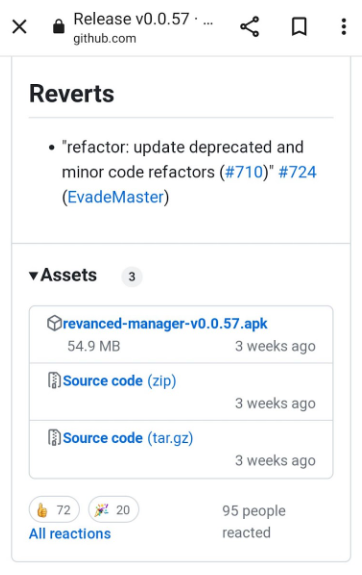
To install the ReVanced Manager, we will need to download a copy of the Vanced MicroG APK. This required application will allow ReVanced Manager to run on non-rooted Android devices. To download this required file, navigate to https://github.com/TeamVanced/VancedMicroG/releases on the Android device and download the APK. Once the file is downloaded, it can be installed from the Samsung File Browser. First, we must allow the software to be installed from the File Manager. We can do this by navigating to the settings for the app permissions and allowing storage access. Then, the manager APK and MicroG can be installed on the Samsung Galaxy device. Figure 2 showcases how this will look on the device.
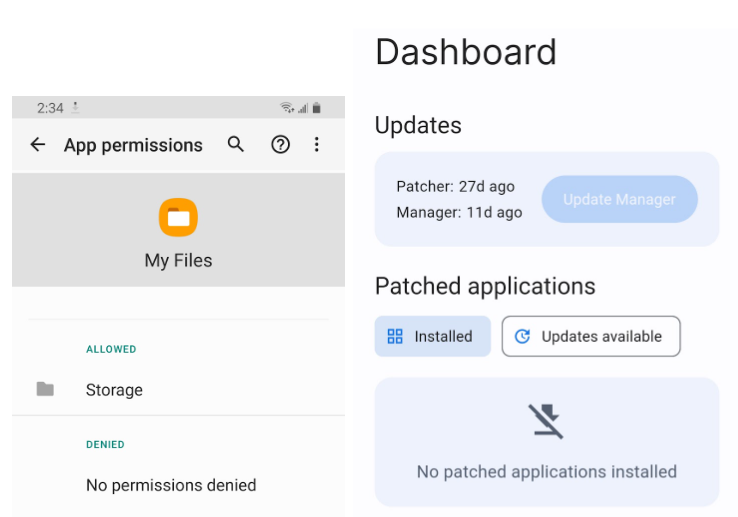
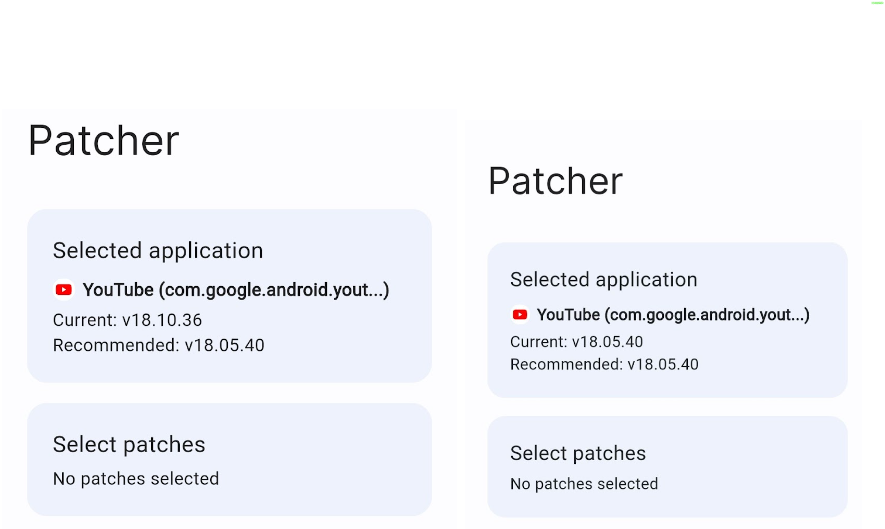
Following the application’s installation, we can open the app and select an application to patch. It is important to note that the ReVanced source code is built for a specific version of the YouTube client. As such, when installing the YouTube app, it is necessary to ensure that the version being installed matches the version of the YouTube client for which ReVanced was built. In this case, the recommended version of the YouTube app for use with ReVanced is version 18.05.40. This version of the YouTube app can be obtained from APKMirror, a popular website for downloading Android APK files. It is recommended to download the APK from a trusted source like APKMirror to ensure that the APK has not been modified or tampered with. Once the appropriate version of the YouTube app is installed, the ReVanced Manager application can select which patches to apply to the YouTube client.
When it comes to modifying an existing app like the official YouTube client, patching is the process of making changes to the app's code or files without the need for access to the original source code. This is usually done through reverse engineering and analyzing the app's binary code to find the parts of the code that need to be modified. When patching the YouTube client with SponsorBlock and other settings, the first step would be to select the specific patches or modifications we want to add to the app.
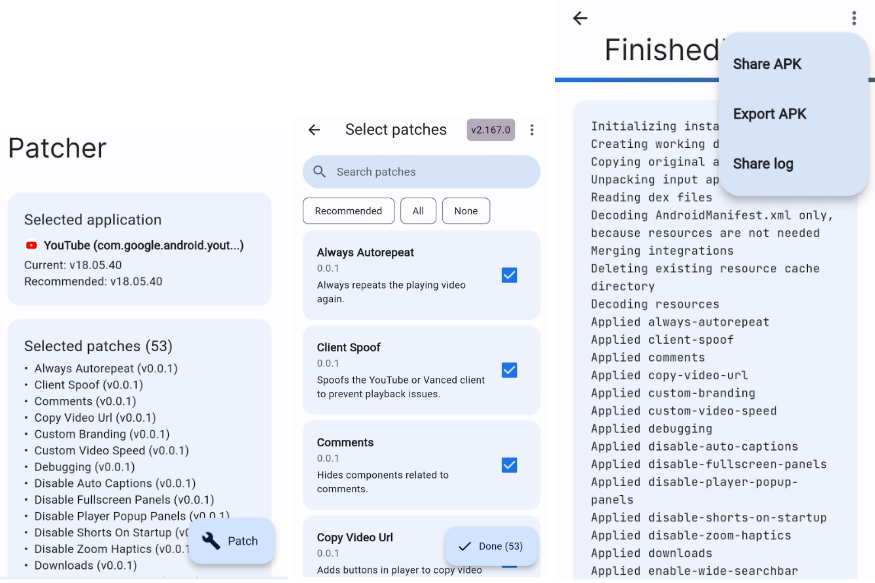
Once we have chosen the patches we want to apply to the Youtube client, we can use a patcher tool to apply the changes to the YouTube app. The ReVanced patcher will first unpack the original YouTube client to extract its files and code. It will then add the selected patches, modifying the app's code and files to include the desired changes. After the patches have been added, the ReVanced patcher will re-pack the modified app, creating a new version of the app that consists of the added patches and modifications. This new version can then be installed on our device like any other app, and our changes will be reflected in the app's behaviour and functionality.
Before closing the patcher window, we will save a copy of the modified Youtube APK to the device by clicking the three dots on the right side of the screen and selecting “Export APK.” A prompt will appear for you to save the modified APK to the phone’s downloads folder. The following section will focus on extracting the APK from the device onto a Windows computer.
Extracting The Modified Youtube APK to a Windows PC
The first step is to move the modified Youtube client to enable developer options. We must follow a few simple steps to enable developer options on our Galaxy S9 and use the Android Debug Bridge tool. First, we'll open the Settings app on our Galaxy S9 and scroll down to "About phone." From there, we'll tap on "Build number" seven times until we see a message that says, "You are now a developer!". Following this, we'll go back to the main settings screen and locate the new option called "Developer options." By enabling this option, we'll be able to connect our Galaxy S9 to our computer via a USB cable and use ADB to run various commands and perform tasks on our device.
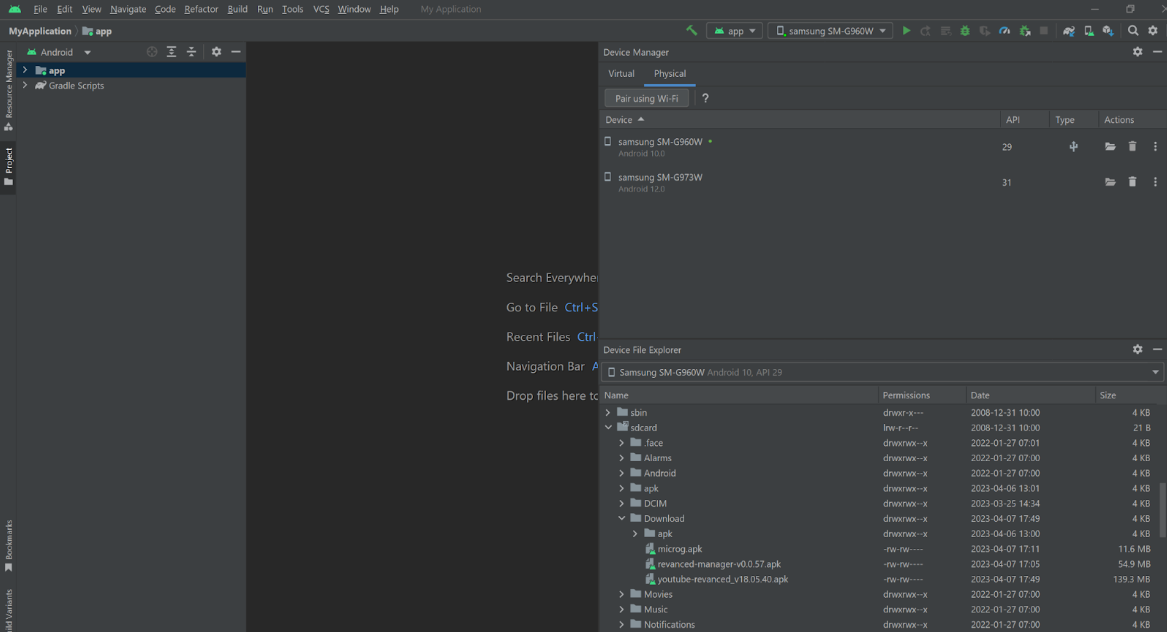
The next step is to install Android Studio onto our Windows PC. Android Studio is the official development software provided by Google to Android developers. We will use Android Studio to connect our Samsung Galaxy S9 to our PC for our use case. Android Studio will also allow us to mirror our device to our computer and navigate through the device's file system. Ensure that the latest version of Android Studio is installed on the device. Once installed, open Android Studio and create a new project. At this point, you will plug the phone into the Windows PC. Android Studio should detect the device, and the user will be able to explore the device utilizing the “Device File Explorer.” This window will allow you to extract the APK to your local machine.
Using APKTool to Decompile the APK
With the modified Youtube APK located on your Windows PC, the next step is to decompile this file to perform a more detailed forensic analysis of the ReVanced Youtube files. To decompile this package, we will utilize a free tool called APKTool. APKTool is a third-party application designed to decode and reverse engineer Android applications. This application is available on Windows, Mac OS X and various Linux distributions such as Ubuntu and Fedora. The only prerequisite software needed to run this software is Java Runtime Environment (JRE) version 1.8.
Once JRE is installed and running on the Windows PC, we will download two files from the APKTool website, apktool.jar and apktool.bat. These files will be placed along with the modified Youtube APK file in a folder in the home directory.
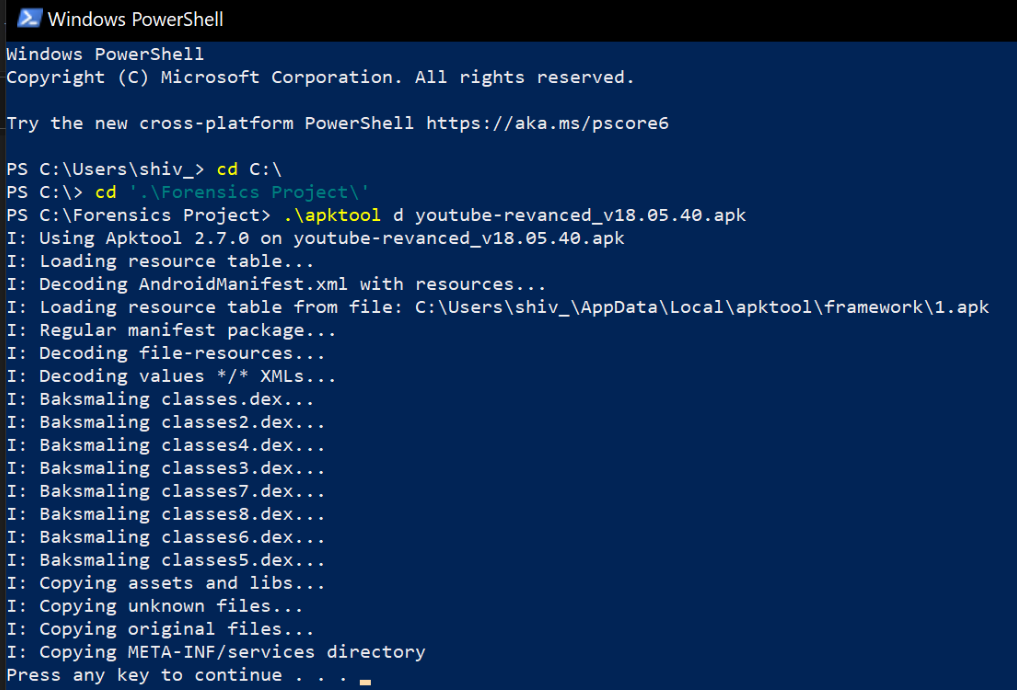
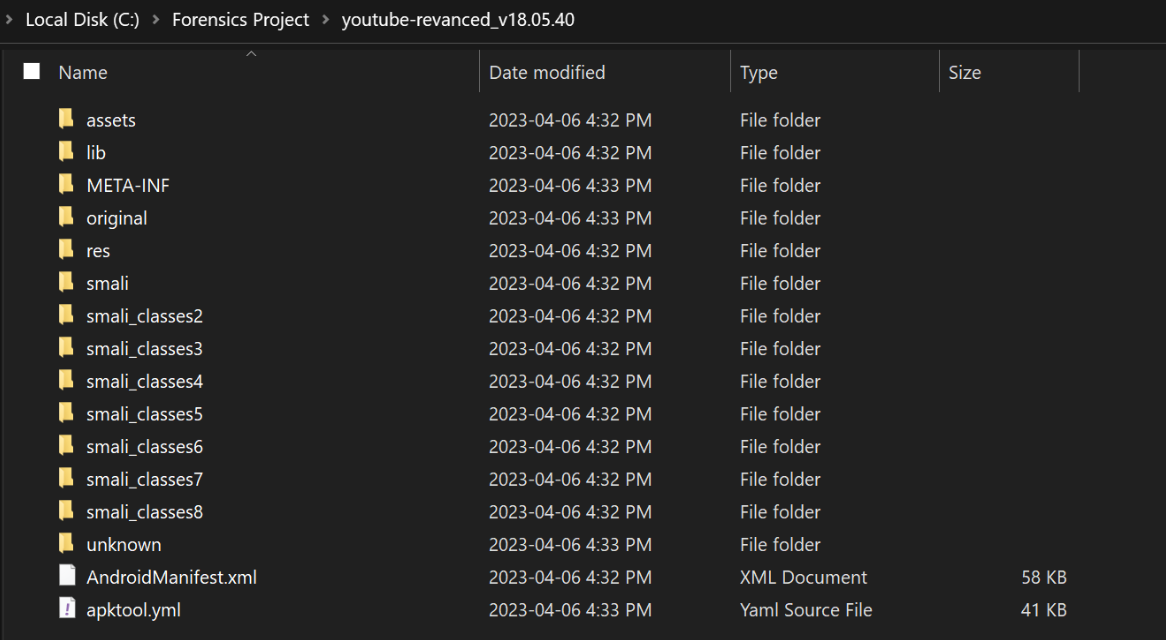
With these three files in the home directory, we can use the APK tool to decrypt the APK file. To decrypt the APK file, we must open Windows Powershell and navigate to our folder containing the three files in the home directory. Once here, we will utilize the command “.\apktool d youtube-revanced_v18.05.40.apk” to decrypt the APK file. Figure 6 showcases the successful execution of the decryption. The contents of the Youtube ReVanced APK can be found in Figure 7.
Source Code Analysis
Due to the open-source nature of the ReVanced Project, all the source code is available for anyone to analyze on the project’s GitHub repository. With this, our group elected to leverage the source code to perform a level of forensic software analysis.
While the ReVanced Project has several files available for users to download, our analysis will focus on the source code for the patcher file. The first file we will provide commentary for is the patcher file, which contains the source code for the Youtube ReVanced patcher. This file will allow us to understand further how the ReVanced patcher application can modify the traditional Youtube application and modify it to include homebrew features. Following this, we will look at the AndroidManifest.xml file in the decompiled Youtube ReVanced APK.
File 1: YouTube ReVanced Patcher Source Code
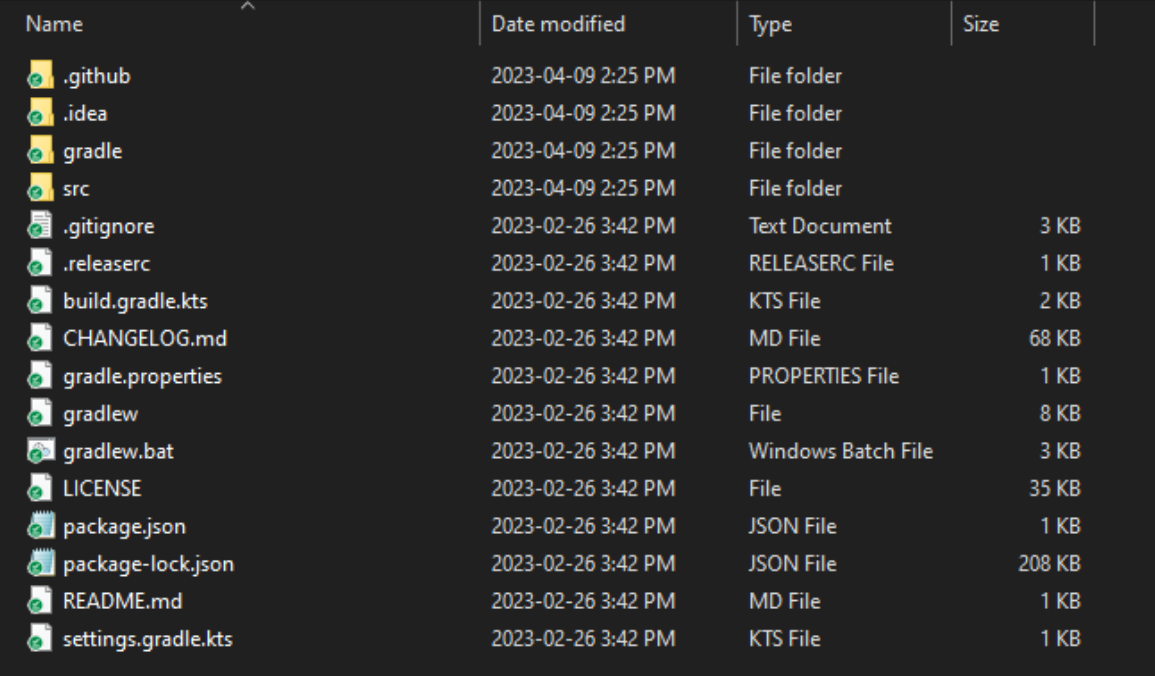
The source code can be obtained directly from the ReVanced GitHub repository. Figure 8 showcases the file directory and all the files that comprise the ReVanced Patcher application on Android devices. Upon a glance at this directory, it is clear that the ReVanced Patcher utilizes Gradle to build the application. Gradle is a toolkit built into Android Studio that automatically compiles Android projects into usable applications for end users.
Gradle works with several programming languages, such as Java, Kotlin and Python. By looking at the gradle.properties file, we could determine which language the ReVanced application was coded in. The ReVanced Patcher application was programmed in Kotlin. Kotlin is a standard programming language that is primarily used in Android development. Due to the ReVanced project created by several contributors, a highly adopted programming language needed to be used.
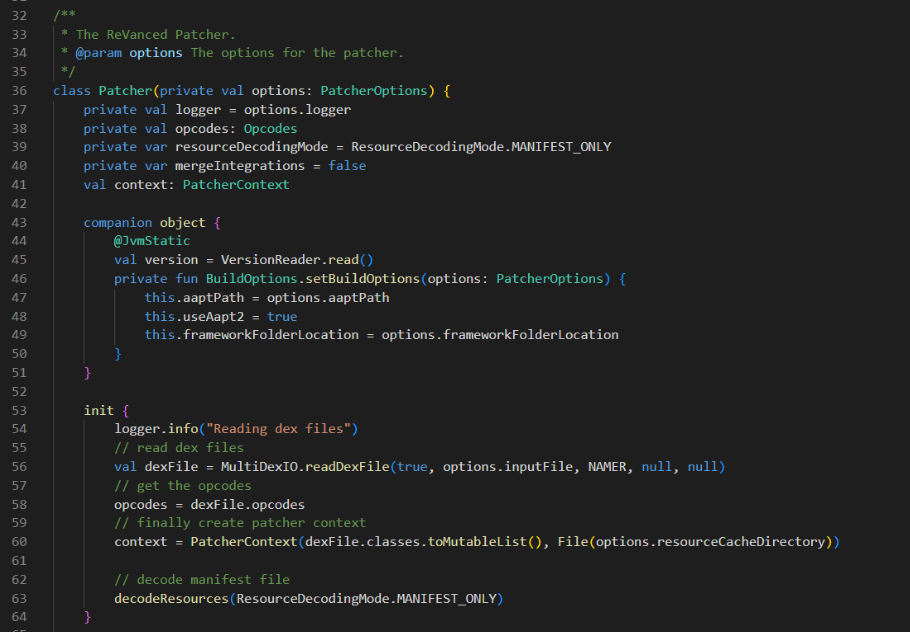
The main file that runs the patcher application is the Patcher.kt file located in the “src “ folder. Figure 9 showcases the first aspect of the code. This section determines what options are available for the user to select and defines the static variables in the code. Line 53 introduces a variable called dexFile, which gives us insight into how the patcher file will attempt to modify the Youtube application. The term DEX refers to Dalvik Executable Format in Android applications. Dalvik is the Java virtualized environment that all Android applications utilize to execute. When an application is ready for compilation, the compiler will store the code of the application in a DEX file, which is stored in the APK file and utilized when the package is installed into the device.
In the “init” function, seen in Figure 9, the ReVanced application searches for the dex file of the Youtube application and decodes its manifest file. The manifest file is an XML file located in every Android application, which outlines the application components, the permissions required, and the minimum software requirements for the application to run on the Android device. By decoding the manifest file, the ReVanced patcher can verify that the application supports the inputted Youtube APK.
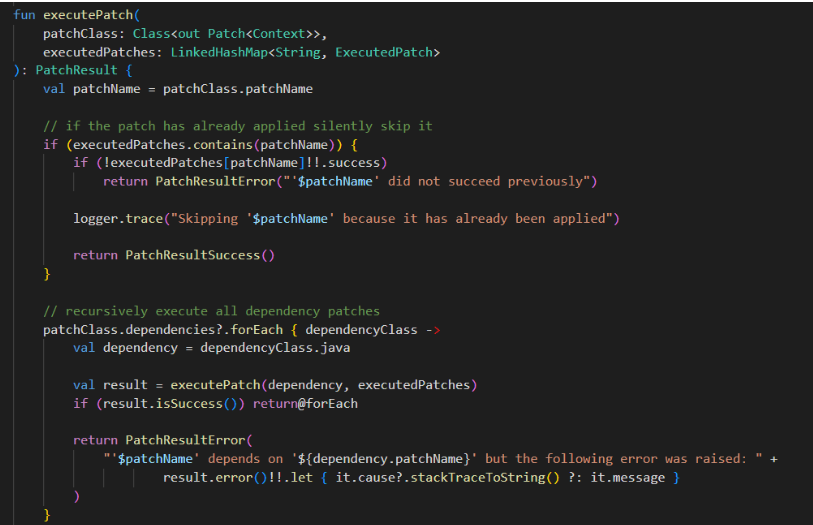
The patcher application searches for specific areas in the dex file that require modification for the homebrew patches. If the patch already exists in the dex file, the patcher will remove it. The patcher application will then create a new dex file with all the latest patches included in the modified dex file. With the modified dex file created, the ReVanced patcher application will implement the patches into the other code segments using the “executePatch” function, as seen in Figure 11. The function executePatch will install the selected patches into the Youtube application. This function utilizes a recursive block of code to verify that all of the necessary prerequisite patches are installed before implementing the selected patches chosen to be installed in the Youtube application.
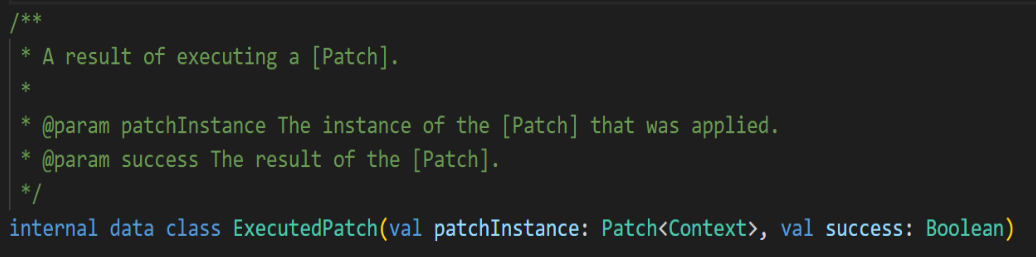
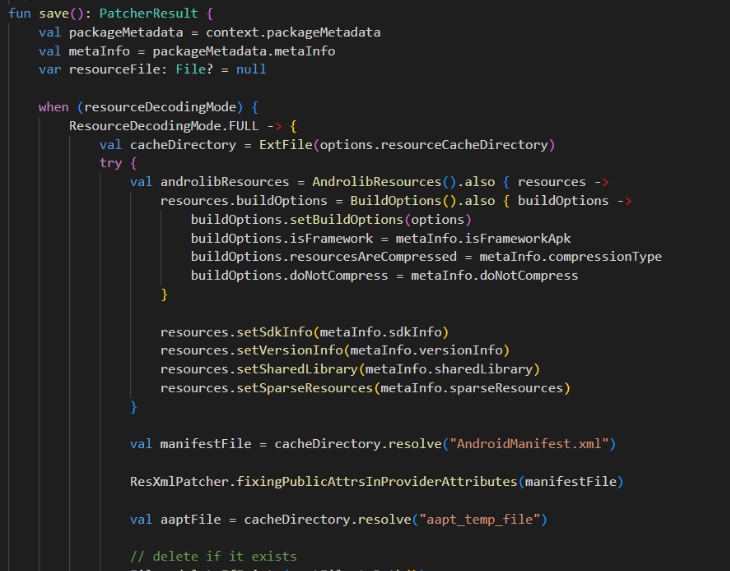
Once the application is complete, the ReVanced Patcher file will determine whether or not the patches were applied correctly, as seen in Figure 12. This would be part of the patching process where users can export the APK to their local device.
File 2: Youtube ReVanced’s AndroidManifest.xml
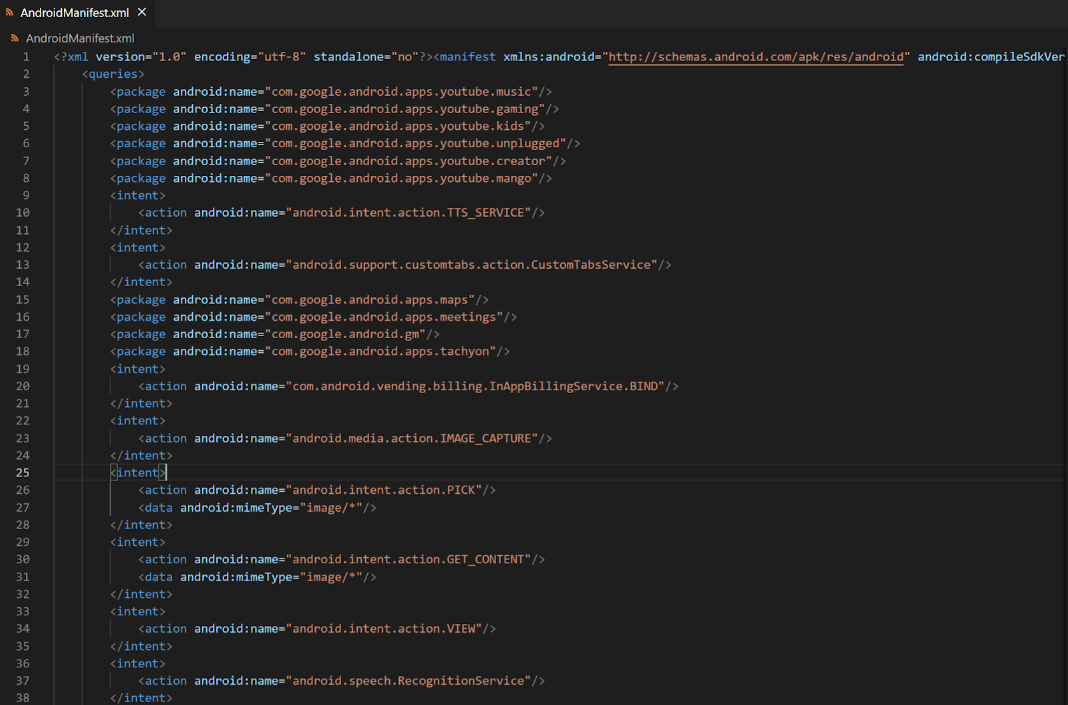
The AndroidManifest file is required for all Android applications. This XML file outlines to the reader what application components, through packages and services, may require to function as planned. The manifest file also contains information about the permissions to which the application will need access. Lastly, the file will outline the necessary device compatibility requirements, such as the version of Android essential to run the application and minimum CPU and RAM requirements. According to our analysis, 11 instances in the Android manifest file reference Youtube Revanced after modifying the original Youtube Android manifest file. Most of those 11 changes are acceptable to ensure that the modified application operates with the new patches in place, such as the permission “uses-permission android:name="app.revanced.android.youtube.permission.C2D_MESSAGE”. The permissions command states that the device will utilize the cloud-to-device messaging module available in the Android operating system.

During our analysis of the AndroidManifest.xml file, we encountered two areas that raised some concerns. The first line that raised some level of concern with everyone is this provider command: “
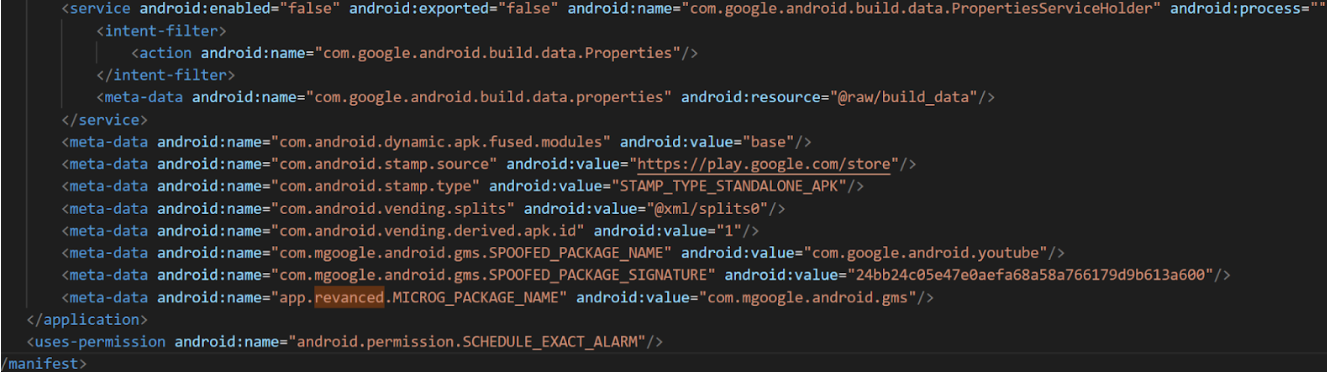
The other line that raised some concern during our analysis of the AndroidManifest.xml command was “meta-data android:name="app.revanced.MICROG_PACKAGE_NAME" android:value="com.mgoogle.android.gms”. This meta-data command showcases the implementation of the MicroG application in Youtube ReVanced. MicroG is a homebrew application that was a part of the prerequisites for installing Youtube ReVanced. This homebrew application is an open-source version of Google’s API for Android. The two lines preceding this metadata command show how the MicroG application can be used to spoof the application to seem legitimate to Youtube’s servers.
Conclusion
In conclusion, using modified applications like Youtube Vanced and ReVanced on Android devices provides users with additional features and functionalities, such as ad-blocking, that are not available in the official Youtube app. However, these modified applications operate in a legal gray area and may be subject to cease and desist orders or other legal issues. The ReVanced project has emerged as a community-driven effort to modify the official YouTube client while removing all YouTube branding from the app while avoiding legal issues.
It's important to know the high-risk nature of installing and using these types of modified applications. They may pose potential security risks, as they require bypassing security measures and making unauthorized changes to the default YouTube application. Moreover, these modified applications may not receive regular updates or support, leaving devices susceptible to security vulnerabilities. The method of patching the client forces the phone to recognize the spoofed client as a regular and safe application when there could be more going on in the background.
Therefore, users should exercise caution and make informed decisions when installing and using modified applications like ReVanced. It's important to weigh the benefits against the risks, considering the legal implications, security risks, and lack of official support. The ability to review source code on GitHub for this specific application makes the decision to install the ReVanced client much easier since it allows a user to understand specifically what is going on with the application. Being mindful of these factors can help users make informed choices when using these modified applications on Android devices.
References
Android Debug Bridge (adb). (n.d.). Android Developers. Retrieved April 11, 2023, from https://developer.android.com/tools/adb
AndroidManifest.xml file in android - javatpoint. (n.d.). Javatpoint. Retrieved April 11, 2023, from https://www.javatpoint.com/AndroidManifest-xml-file-in-android
Android Runtime (ART) and Dalvik. (2022, September 13). Android Open Source Project. Retrieved April 11, 2023, from https://source.android.com/docs/core/runtime
Apktool - How to Install. (n.d.). GitHub Pages. Retrieved April 11, 2023, from https://ibotpeaches.github.io/Apktool/install
App manifest overview. (n.d.). Android Developers. Retrieved April 11, 2023, from https://developer.android.com/guide/topics/manifest/manifest-intro
Configure your build. (n.d.). Android Developers. Retrieved April 11, 2023, from https://developer.android.com/build
Dalvik executable format. (2022, October 28). Android Open Source Project. Retrieved April 11, 2023, from https://source.android.com/docs/core/runtime/dex-format#leb128
Definition of Dalvik. (n.d.). PCMag. Retrieved April 11, 2023, from https://www.pcmag.com/encyclopedia/term/dalvik
Download Android Studio & App Tools. (n.d.). Android Developers. Retrieved April 11, 2023, from https://developer.android.com/studio
Get started with Kotlin. (2023, April 9). Kotlin. Retrieved April 11, 2023, from https://kotlinlang.org/docs/getting-started.html#install-kotlin
(2022, September 9). Android Developers. Retrieved April 11, 2023, from https://developer.android.com/guide/topics/manifest/provider-element
Releases · TeamVanced/VancedMicroG. (2022, March 9). GitHub. Retrieved April 11, 2023, from https://github.com/TeamVanced/VancedMicroG/releases
revanced/revanced-manager: 💊 Application to use ReVanced on Android. (n.d.). GitHub. Retrieved April 11, 2023, from https://github.com/revanced/revanced-manager
revanced/revanced-patcher: 💉 Patcher used by ReVanced. (n.d.). GitHub. Retrieved April 11, 2023, from https://github.com/revanced/revanced-patcher
revanced/revanced-patches: 🧩 Patches for ReVanced. (n.d.). GitHub. Retrieved April 11, 2023, from https://github.com/revanced/revanced-patches